How to spot a crypto scam tool
Fake wallets, copycat extensions, bogus airdrop checkers and trading bots that promise too much. Learn the red flags of a scam crypto tool and the checks to run before you connect a wallet.
By CoinSeek Team · · 7 min read
Crypto has thousands of useful tools: wallets, trackers, scanners, dashboards and bots. It also has a steady stream of fakes built to look like them. A scam tool does not need to hack anything. It only needs you to type in a seed phrase, approve one transaction, or install one extension, and it can empty a wallet in seconds.
This guide covers the most common kinds of scam tools, the red flags they share, and a short routine you can follow before you trust any new app. It is written for people who are new to crypto, but the habits are worth keeping at every level.
The kinds of scam tools you will meet
Copycat websites and apps
The most common trick is a near-perfect copy of a real tool. The site looks right, the logo is right, but the address is slightly different: a swapped letter, an extra word, a different ending. These copies are often promoted through paid search ads, so they can appear above the real site.
Fake browser extensions and mobile apps
Fake wallets and "helper" extensions appear in app stores from time to time. They may work normally at first, then send your seed phrase or private keys to the scammer. Ratings and download counts can be faked, so they are not proof of anything.
Bogus airdrop and eligibility checkers
"Check if you are eligible for the airdrop" is a classic lure. The page asks you to connect a wallet and sign a message. That signature is actually a permission that lets the scammer move your tokens. Real airdrop checks rarely need more than a public address.
Trading bots and "AI" tools that promise returns
Some tools promise steady profits, guaranteed returns or secret strategies, and ask you to deposit funds or hand over exchange keys with withdrawal rights. Legitimate trading tools talk about features and risks, not guaranteed income.
Fake support and recovery services
After a loss, scammers pose as support staff or "fund recovery" experts, often in direct messages. They ask for fees, seed phrases or remote access. Real support teams do not start conversations in your messages and never ask for your seed phrase.
Red flags to check before you trust a tool
Most scam tools trip at least one of these alarms:
- It asks for your seed phrase or private key. This is the clearest sign of all. No legitimate website, extension, support agent or bot needs your seed phrase to show you data. The only time you type it is when you restore a wallet you control, inside that wallet's own app.
- The address is not quite right. Compare it letter by letter with a link you already trust.
- You found it through an ad, a direct message or a reply. These are the channels scammers rely on most.
- It creates urgency. Countdowns, "last chance" banners and limited spots push you to skip checks.
- The promises are too good. Guaranteed returns, risk-free profit and fixed daily yields are marketing, not features.
- It asks for more permission than the job needs. A price tracker should not need to move your tokens. A portfolio view needs a public address, not a signature.
- You cannot find an independent history. No track record, no public team or code, and no discussion outside the project's own channels is a reason to slow down.
Read what you sign
Many modern scams do not steal your seed phrase at all. They trick you into approving a transaction or signing a message that gives away control of your tokens. Before you confirm anything in your wallet:
- Read the request. Does it ask to approve spending of a token, or to set an "approval for all" on your collection? Ask why a simple tool would need that.
- Check the amount. An approval for an unlimited amount gives the other side access to all of that token, now and later.
- Check the site you are on. A request that appears on a page you did not mean to visit should be rejected.
- When in doubt, reject. You can always come back later after checking. A rejected request costs nothing.
Tools that help you spot risky requests
Some browser extensions sit between a website and your wallet and warn you when a request looks dangerous, for example by simulating the transaction and showing what would leave your wallet. These tools in the CoinSeek catalog are listed for scam or phishing detection. Each card shows the pricing and chains the catalog stores:
GoPlus offers security checks you can run on tokens, addresses and websites, and the catalog lists Ethereum and Solana among its chains:
Remember that a protective tool is still a tool you must install. Get it from the official site or the official store listing, and check the publisher name before you add it. The full list for this job is on the phishing detection page:
Popular tools for phishing detection
 GoPlus
 offers holistic AI and Web3 security. Leveraging AI-powered audits and APIs, we safeguard assets and operations across the blockchain and AI landscapes.
 WEB3 ANTIVIRUS
No more worries about risky signature requests and transactions. Web3 Antivirus detects crypto scams and warns you before you sign anything.
 Scam Sniffer
Scam and malware domains and the addresses behind drainers, exploits, and on-chain thefts, verified and labeled. One API for wallets, exchanges, and security teams.
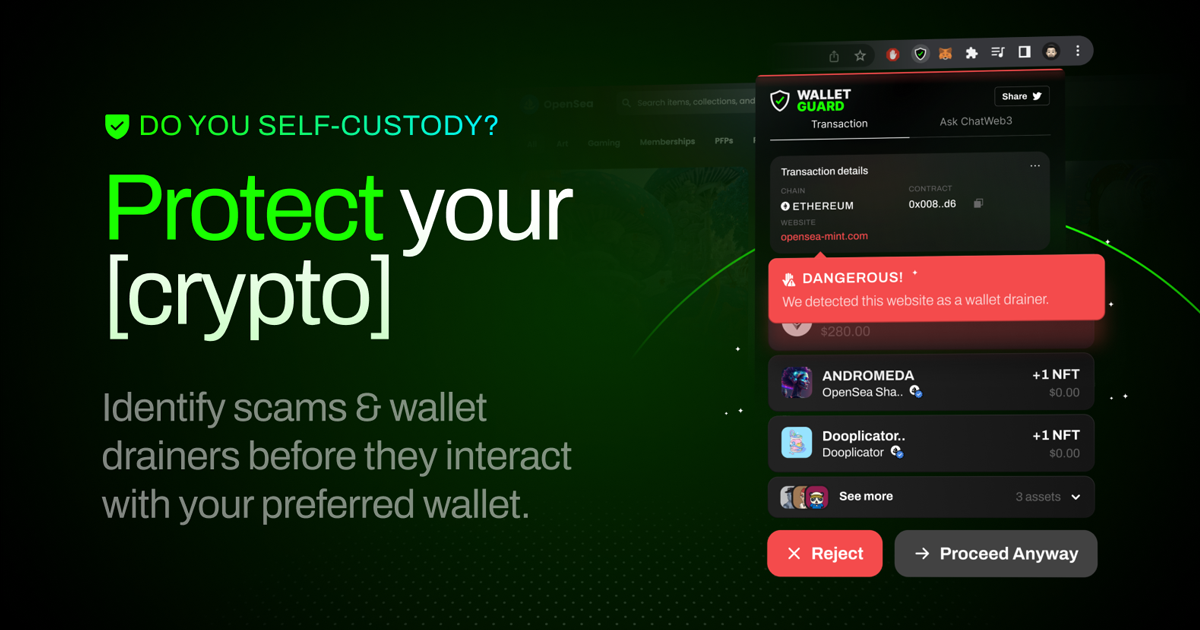 Wallet Guard
The most advanced open-source browser extension that identifies scams & wallet drainers before they interact with your preferred wallet.
A five-minute routine for any new tool
Before you connect a wallet to a tool you have not used before, run through these steps:
- Find it from a source you trust, not from an ad or a message. A search engine for tools, such as CoinSeek, can help you find the official website of a tool, but a listing is not a security guarantee; still check the address yourself.
- Check the web address letter by letter against the official one.
- Search for the tool's name with the word "scam" and see what people report.
- Use a fresh wallet with a small balance for anything new. Keep your main holdings in a wallet that never connects to experimental tools.
- Read every request your wallet shows you, and reject anything you do not understand.
- Review your approvals from time to time and remove the ones you no longer need. Our wallet security page lists tools that help.
What to do if something feels wrong
If a tool asked for your seed phrase and you typed it in, assume the wallet is compromised. Create a new wallet on a device you trust, and move what is left as soon as you can. If you approved a suspicious transaction, revoke that approval and watch the wallet closely. Report the site or app to the platform that hosted it, and warn others in the community where you found it.
And be very careful with anyone who reaches out afterward. Scammers often target the same victims twice, posing as investigators or recovery services.
Summary
Scam tools win by looking familiar and making you hurry. Slow down, open tools only from addresses you have checked, never share a seed phrase, read every signature, and test new tools with a wallet that holds very little. For token-level checks, see our guide on how to check if a token is a honeypot, and browse the scam detection page for more tools.